Subscribe all latest updates via Facebook

Facebook Likebox using jQuery Lightbox v1.0 Extended by Tech Prevue

Showing posts with label Apple. Show all posts

Tuesday, September 17, 2013

FIFA 14 For iOS Released, Download Now For Free!

1 comment
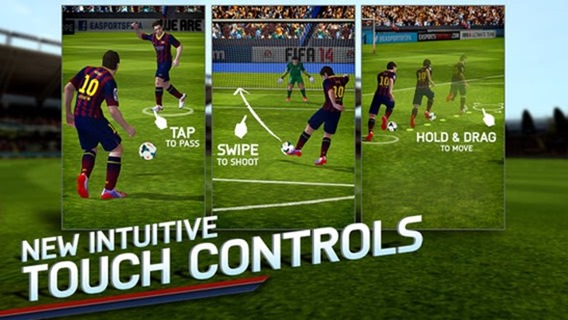
It may still be a week until FIFA 14 gets its console release, but that doesn’t mean that those packing an iOS device can’t get their (proper) football on.
Released as a 1.16GB install and costing nothing, the game is using the much travelled premium route in an attempt to get itself to the top of Apple’s game charts. Costing nothing up front is all very well and good, but if you’re going to nickel and dime your users afterwards then all everyone’s left with is a bad taste in our mouths. Thankfully, it would appear that someone at EA got things right this time around.
FIFA 14 iOS
screen568x568
In-app purchases come in two flavors. First, gamers can buy in-game currency just as seems to be the norm with any game that features in-app purchases. Secondly, and more interestingly, there’s an option to unlock the game’s ‘Premium’ mode for $5.99. Paying your six dollars kickoff, tournament, and manager modes, so we expect that’s the route that most people will want to take with FIFA 14.
screen568x568 (1)
All this sounds great, but there’s one issue. Currently, as far as we can tell, FIFA 14 is only available to gamers who use the New Zealand iOS App Store. Users in the US and UK are certainly out of luck currently, but if you know differently we’d love to hear from you.
There’s no word yet as to whether this is a soft launch of sorts, or whether the game will roll out to other regions over the coming hours. Soft launches are becoming more and more common as developers use them as a sort of public beta, especially if their game has a strong multiplayer or online element that means servers need stress testing or leveling needs tweaking.
screen568x568 (2)
At this point we’d like to think that the folks at EA know just what it takes to make a FIFA game work on iOS, but until told otherwise we’ll have to assume that the game isn’t coming out until the 24th of September, just like its big brother.
(Download: FIFA 14 for iOS on the App Store)
Read More...

Wednesday, September 11, 2013

iOS 7 GM (Gold Master) On iPhone 5 – Early Impressions

Leave a Comment
All the talk right now is understandably centered around the two new smartphones that Apple will be unleashing to the world on September 20th. The iPhone 5s and iPhone 5c were officially unveiled by Phil Schiller at Apple’s Cupertino Campus yesterday, and the two will no doubt be hugely popular with buyers next week. While the hardware is certainly catching the eye, the new handsets are more than just some new specs or fancy plastics. There’s iOS 7, too.
I’ve been using the beta releases of iOS 7 from day one, and I’ve been keeping you all apprised of how they have progressed from iOS 7 beta 1, right through to iOS 7 beta 6 that I was running till this morning. Now though, my iPhone 5 is running the latest, and last iOS 7 version that we will see – iOS 7, Golden Master.


The final build of iOS 7, and bar any last minute changes the version that will launch on September 18th, the GM should be as stable as stable gets, and there shouldn’t be any surprises as far as features are concerned when the big release comes. Apple is still Apple though, so we won’t rule out anything at this point.
So, iOS 7 GM download went live after the event yesterday, and I’ve been using it for a few hours now. What’s new? Well, not a lot, really. You’ve probably already seen the new wallpapers that have been added, with the majority clearly aimed at the new, more colorful iPhone 5c handsets that will go on sale next week. They’re nice and all, but they don’t tend to sit too well on my black iPhone 5 – especially the bright red one! Still, if you’re really fond of bright colors, or indeed color blind, then you may well like what you see.


There are new ring and alert tones, too. Mostly you’re going to notice newly revamped versions of all the classics, which is nice. The new tones especially get a big thumbs-up, but it’s not exactly going to make anyone rush out to buy an iPhone over the competition. Still, anything new is a bonus here.
As has been the case with other beta releases, the biggest change is the speed at which things happen. Animations seem to have been cut shorter once more, and things are again snappier than with previous betas. Apple seems to have been tweaking things throughout the beta process, trying to find a happy medium between speed and having fancy animations to show off. I’d rather things work quickly than have to sit and watch something slide around my screen before I can do anything, but maybe I’m the only one who thinks that way.


We’re now just a week away from iOS 7 being something that everyone can get their hands on, and I think people will like it. Once the jarring icons have settled into everyone’s consciousness and they’re all used to the new colors, I’m sure they will come to admit that iOS 7 feels more modern, more alive than previous releases of Apple’s mobile OS. It’s still not perfect, but it’s better.
And you can’t ask for more than that!
Read More...

Monday, September 9, 2013

Alleged iPhone 5S render shows new home button / 'Touch ID sensor

Leave a Comment

We're just a few hours away from Apple's big iPhone press conference, andNowhereelse.fr has just posted this render (from a "very reliable" source) that claims to show the iPhone 5S. The most notable change shown is of course, the home button, seemingly minus the usual squarish target and called the "Touch ID sensor". That is expected, considering repeated rumors (check out our roundup) including an apparent confirmation tonight from the Wall Street Journal, that Apple's next flagship phone will include a fingerprint sensor. Whatever the truth is, it will be unveiled at 1PM ET, and we'll be there liveblogging every minute.
Read More...

Tuesday, August 27, 2013

Official Chromecast App For iOS Is Now Available To Download

Leave a Comment
The Google Chromecast dongle has been making some ripples recently in the portable technology world. The little $35 dongle allows users to stream high-definition content directly to a TV set through service providers such as Netflix and YouTube. The content may be fairly limited at the moment, but with the Mountain View company planning on adding additional providers, the future looks bright for Google’s little connected device. Having said that, controlling and interacting with the Chromecast got a tad bit easier with the official release of the Chromecast app for iPhone, iPad and iPod touch devices.
Google is pushing the Chromecast as being one of the easiest ways for enjoying online videos and Web based content directly on the big screen in your home. The release of the universal iOS app certainly indicates that the company is committed to developing the product and ensuring that it’s as easy as possible to use and maintain. The majority of people are familiar with interacting and using smartphone apps, and the Chromecast app does a fairly good job of abstracting away any would-be complicated setup and maintenance processes.


The look and feel of the app follows Google’s trend of pushing out very clean and minimal software. It is immediately recognizable when placed alongside the Gmail or Google Maps apps, with the iPhone and iPad variants following the same design considerations. Rather than being a fully functional media based app, the Chromecast app is more of a setup and settings tool that allows users to get up and running with multiple Chromecast installations throughout the home and ensure that everything is working correctly. In short, it’s a ditto copy of itsChromecast for Android counterpart.


Users of the app can also interact with the currently running Chromecast dongles existing on the same network. A number of different device settings can be changed through the iOS app, which include amending the Chromecast dongle name as well as manipulating the currently connected Wi-Fi network. The actual dongle itself seemed like an extremely appealing option for those who love consuming visual media, but with the promise of additional content providers, and now the release of native apps, it’s starting to look like a must-have piece of kit.
(Source: Chromecast for iOS on the App Store)
Read More...

Monday, August 26, 2013

First hands-on video comparison of gold iPhone 5S/5C/5 casing emerges

Leave a Comment


You’ve seen the supposed photos of the upcoming iPhone 5S’s chassis and watched a video depicting the scratch-resistance of the plastic iPhone 5C. Now what? Well, how about the ultimate video hands-on showing off the rumored gold/champagne iPhone 5S and a blue iPhone 5C variant next to an iPhone 5?
Your prayers have been listened to: you’re in for a treat as one blogger has posted exactly such footage, and it’s been making the rounds this morning…
Dom Esposito of AppAdvice has gotten hold of a high-definition video that seems to provide a rather detailed comparison of what appears to be the casing of Apple’s rumored gold iPhone 5S and the polycarbonate plastic iPhone 5C.
The clip compares the iPhone 5S/5C casing to the existing two-tone aluminum and glass design of the current-generation iPhone 5, have a look below. Of course, there’s no telling whether these parts are legit, even if they line up with previous leaks.


Esposito writes:
As shown in the video, the back inlay on the gold/champagne iPhone 5S has enough room to accommodate the rumored dual LED flash, but aside from its color, there’s not much of a difference when compared to the iPhone 5.
The author notes that the “iPhone” text on the back appears to be a bit thinner on the 5S relative to the 5, though“its font matches the text found on the blue iPhone 5C”.
As per usual, you’re advised to proceed with caution, pinches of salt and everything.
A couple notes here.
Firstly, even though these images look authentic, there’s no telling whether the supposed plastic iPhone represents a genuine part or if it’s some prankster’s exquisite 3D print (imagine that).
Secondly, that gold iPhone 5S casing could have been easily faked by anodizing the existing iPhone 5 chassis and most people wouldn’t be able to tell the difference.
Thirdly, it could also be a counterfeit iPhone – they’re that good.
Fourthly, the iPhone 5C shell could be for an Android handset – it wouldn’t be the first time a white-label maker sold an Android phone based on the budget iPhone design.


And lastly, even if these are actual prototypes, there’s no telling if we’re dealing with the final designs here or early-stage prototypes that Apple could have dropped long ago.
For the sake of completeness, our favorite parts leaker Sonny Dickson published the above image today, suggesting another possible iPhone 5S color option – graphite.
At any rate, the prevalence of these “leaks” is a tell-tale sign we’re getting close to the official announcement.
Read More...

Thursday, August 22, 2013

Asphalt 8: Airborne For iOS And Android Now Available To Download [VIDEO]

Leave a Comment
Gameloft has taken to the mobile industry like a duck to water, and with a wide range of different titles available for both iOS and Android, the company has built a solid reputation for high-end, graphically-intensive fare. Asphalt, a nitrous-charged racing game, has been a staple part of the company’s range for a number of years, and today, the company has released Asphalt 8: Airborne for both iOS and Android. In addition, the Paris, France-based developer has revealed that the game will soon be arriving for Windows 8 and Windows Phone 8, while also outlining its intention to port a multitude of titles over to Microsoft’s fledgling platforms.
While exciting news for fans of racing titles, Asphalt 8: Airborne delivers much more of the same to anybody familiar with the series. Since the graphics, gameplay and selection of courses and challenges has always been top-notch, the continuation of this same ethos means Asphalt 8: Airborne is once again a joy to behold.


Asphalt 8 will soon be hitting Windows 8 and Windows Phone 8, and in what will serve as great news for a platform notably bereft of good games, Gameloft has announced that 14 other titles will be hitting the Windows Stores in the next year or so.


Among them, the likes of Dungeon Hunter 4, Despicable Me: Minion Rush, Total Conquest, and Six Guns – all of which will hit the market before the close of the year. Unfortunately, there’s no list for gamers on Windows to begin salivating over, but we’ll be keeping an eye out for specifics on those forthcoming titles as they become available.


Baudouin Corman, Gameloft’s Vice President of Publishing in the Americas, was beaming in his announcement of the new releases, noting:
Gameloft’s AAA-quality games are a perfect match for Windows 8 and Windows Phone 8 . . Microsoft’s platforms provide a great environment for serious and deeply engaging games. Gameloft will bring its full support, taking advantage of the platforms’ specific features.
While we await the new releases for Windows 8 and Windows Phone, the adrenaline-pumping eighth installment of Asphalt can be gathered via the links provided below.


(Download Asphalt 8 for iOS / Android)
Be sure to check out our iPhone Apps Gallery and iPad Apps Gallery to explore more apps for your iPhone and iPad, and also our Android Apps gallery to explore more apps for your Android device.
Read More...

Sunday, August 18, 2013

How To Make, Receive, And Record Your Smartphone Calls From Your Mac [VIDEO]

Leave a Comment
Not so long ago, a computer was a computer, and a smartphone was a smartphone, but as the digital boom has continued to make strides, we’ve seen many a feature cross platform to ensure a more streamlined overall experience to the end user. Recognizing that checking one’s device constantly whilst at the desk can be somewhat counterproductive, developers have sought to find ways to bridge the gap, bringing seamless controls of certain mobile features without the need to look away. Dialogue, a new app for OS X, follows this motif to the book, allowing you to control your smartphone while using your Mac.
Not only is it light and rather easy on your resources, but it has its fair share of great little features to boot. Not only can you make calls using the app, but you can also record them, so if you’ve any important correspondence to which you may wish to refer back to later, you can save the file right on your desktop. Cool? We think so.


In essence, the app is like an extension of the Skype idea of making calls through a computer, but while you can usually get away with Skyping using your machine’s default mic and speakers, the makers of this app, Zebraa, suggest you’re probably better off buying a pair of headphones with a built-in mic for optimum performance.


The app is still fledgling, so does have its fair share of kinks that still need working out. As well as a slightly sub-par in-call performance, there are also some issues with contacts, which need to be synced to the desktop rather than being seamlessly plucked from iCloud. It’s not that much of a big deal, mind, and the app is still relatively usable even with these shortcomings. Also, Zebraa will be amending the problem in forthcoming updates, so for an initial release, the overall experience certainly isn’t bad going.


At just $6.99, it’s well worth a shot, particularly if you’ve been waiting in the wings for this kind of solution. If you don’t like apps that run like they’re still in beta, you may wish to hold off until the expected improvements are made, but for overall usefulness, Zebraa has the calling-from-the-desktop thing licked. And yes, it doesn’t just work with the iPhone; it does support many Android and Windows Phone devices out there.


(Download: Dialogue for Mac on the Mac App Store)
Be sure to check out our Mac OS X Apps Gallery to explore more apps for OS X powered computer.
Read More...

Sunday, August 11, 2013

How to Hack someones Whatsapp and read their chat messages

Leave a Comment

Let’s Get Started 


1. WhatsApp Sniffer

WhatsAppSniffer is a tool for root terminals to read WhatsApp conversations of a WIFI network (Open, WEP, WPA/WPA2). It captures the conversations, pictures / videos and coordinates that aresent or received by an Android phone, iPhone or Nokia on the same WIFI network. It has not been tested with W indows Phone terminals. It can’t read the messages written or received by the BlackBerry’s, as they use their own servers and not WhatsApp’s.
This application is designed to demonstrate that the security of WhatsApp’s communications is null. WhatsAppSniffer just use the TCPDump program which reads all the WIFI network packets and filters those which has origin or destination WhatsApp’s servers. All messages are in plain text, so it does not decrypt anything, complying fully with the legal terms of WhatsApp (3.C: “While we do not disallow the use of sniffers Such as Ethereal, tcpdump or HttpWatch in general, Any we do going efforts to disallow reverse-engineer our system, our protocols, or explore outside the boundaries of the ordinary requests made by clients WhatsApp …. “)
For WPA/WPA2 encrypted networks, if uses the tool ARPSpoof (optional).

 Requirements

  1. A Rooted Android Device.
  2. Your Victim Should Use Same Wi-Fi Through Which you are connected.
  3. WhatsAppSniffer Donate ★ root v1.03.
This Trick is much similar to Hack your Friend’s Facebook Account

2. Decrypting Conversations

have your victim locked his whatsapp? or you want all his conversation on your PC. Generally for security reasons WhatsApp encrypt Conversation while taking backup in SD Card or Phone Memory.But i have found a tool on XDA that claims to decrypt all the whatsapp conversation down to your PC.
If you have some access over his device you can also send files from Bluetooth to your device and later read all the conversations.
This tool is called WhatsApp Xtract and for this all credits goes to ztedd
Some general advice on how to backup Whatsapp and get the database file:

Android

- In Whatsapp go to settings – more – Backup Chats
- Copy the folder “Whatsapp” on the SD card to your backup location (e.g., PC)
- (ideally also) use the app Titanium Backup to backup the full whatsapp application together with its data, copy the backup from the folder “TitaniumBackup” on the SD card to your backup location (e.g., PC)
- Use this tool Whatsapp Backup Extractor (download in this thread) to show the chats in a friendly readable format. The necessary files “wa.db” and “msgstore.db” you will find inside the Titanium Backup archive “com.whatsapp-[Date]-[some digits].tar.gz”, alternatively (without Titanium Backup) you can use the msgstore.db.crypt file from the folder Whatsapp/Databases on the SD card.

iPhone

- use Itunes to create an unencrypted Backup
- use an Iphone Backup Tool to get the file net.whatsapp.WhatsApp/Documents/ChatStorage.sqlite, e.g. I-Twin or Iphone Backup Extractor. Make sure to create an unencrypted backup with Itunes, as these tools can’t handle encrypted backups. Another possibility are forensic tools like UFED Physical Analyzer.)

Blackberry

- sync your blackberry with desktop manager and then copy the messagestore.db file from SD
- however, it seems that this file is encrypted? Currently we don’t know how to get the unencrypted messagestore.db file
- Blackberry not supported yet!

Nokia

 - not known yet
- Nokia not supported yet!
For Further Detail about this Method you can move to this Forum of XDA.

3. Using Spywares

Using 3rd Party Spywares can be very useful for spying not only WhatsApp Conversation but also many things like, you can able to Track GPS Location, you can capture the lock screen passwords and they can be also used for monitoring Websites. there are many spywares in the market but i recommend is BOSSPY. Because it’s free:)

Some Misconceptions about WhatsApp hacking

after writing ”4 WhatsApp Tricks and Hacks [Android]” I have received a number of E-Mail Most of them were asking for help for hacking their partner’s WhatsApp and I have replied them all. but lots of people were having misconceptions about whatsapp hacking so let me discuss over here.
  1. Hacking WhatsApp is Much Harder than Hacking Facebook and Twitter as Facebook and Twitter can be Hacked using Social Engeenering Techniques like Phising and many others when we compare to hack someones WhatsApp Account and Gain Full Access over his Account – It is nearly Impossible.
  2. There is no tool that can hack whatsapp and give you a full access over someone’s whatsapp account. Yes, there are Lot’s of Youtube Video’s ,Websites Filled with “WhatsApp Hack Tool” which claim that they can but the reality is they can’t.


* This article is for educational purposes only. we are not responsible for actions of any individual
Read More...

Thursday, August 1, 2013

‘iPhone 5C’ Will Have An 8-Megapixel Camera Sensor, According To Latest Leak [IMAGE]

Leave a Comment
The rumors surrounding the existence of a lower-cost, budget based iPhone simply won’t seem to go away and have even accelerated to the point where a number of sources are suggesting that the device is already in production. Although the alleged hardware is yet to be confirmed – or strenuously denied – by any official source, a number of leaked components that are said to be from the device could potentially give an insight into the expected specification.
Earlier leaked images have shown what many corners believe could be the faceplate panels from the budget device that would bear a remarkable resemblance to the existing iPhone 5. The only main physical and aesthetic difference being that any budget variant of the device would come with a plastic back panel to keep costs at a minimum. To go hand-in-hand with those leaks, a new image has emerged that is said to show the camera module that will ship with the low-cost iPhone, or iPhone 5C as many are calling it.
If the module itself looks similar, then worry not, as the originating source is suggesting that it’s the same 8-megapixel sensor that allows the iPhone 5 to capture the glorious images that users have become used to. If indeed this is the same module lifted from the current-generation iPhone then the only difference would seem to be the plastic casing that surrounds and protects the sensor itself. The existence of this particular component in its shown form would seem to pour water on the suggestion that a cheaper iPhone intended for emerging markets would only come with a 5-megapixel rear camera.

The idea of Apple releasing a "cheap" or "budget" device is still something that a lot of fruit fans and analysts can’t get their heads around. In recent years, the Apple brand has become synonymous with premium products that sit at the higher end of the price scale in their respective markets. The suggestion of the company introducing two new iPhones as part of this year’s product refresh definitely can’t be ruled out, but it seems a lot more likely that any budget based announcement would far exceed the technical specification and quality standards that seems to have been reported thus far.


Video review


With iOS 7 currently sitting on beta 4, with August underway and an expected announcement in September, it won’t be long until we find out exactly what Apple has planned.
(Source: IT168 [Google Translate])
Read More...

Monday, July 29, 2013

iOS 7 Beta 4 On iPhone 5: First Impressions

Leave a Comment
Arguably a week late due to Apple’s developer portal security breach and then that portal subsequently being offline for far, far too long, iOS 7 beta 4 is now finally in the hands of developers. Three weeks after the third beta was pushed out, this new fourth iteration brings with it the usual raft of interface changes as well as some tweaks under the hood. I’ve been using it for a good few hours at this point, and following on from my previous posts along the same vein, here’s how beta 4 is shaping up in these early hours after I updated my iPhone 5.
You don’t need to be some kind of ninja in order to get your hands on a change log for iOS 7 betas, and the fourth release is not much different to the three that came before it. I suspect the ones that come after it won’t differ a great deal either, but with iOS 7 being such a departure from the norm, and with so many changes shaking iOS users to their very core, this release of Apple’s iPhone and iPad software is as much about how it makes us feel as it is how it works at a fundamental level. After a few hours of use, beta 4 already feels rather different to the release that came before it.


Possibly a minor change, but one that new users and iOS novices will be very grateful for, is the removal of the lock screen arrow that implied an upwards swipe would unlock the device. Anyone with even a passing knowledge of iOS would know that a horizontal swipe is needed in order to get into the device, but that doesn’t make it good design. It’s a little change that makes much, much more sense now. We just wonder why it took four goes before they got it right.


As seems to be the case with each of these beta releases, Apple has tweaked and improved the animations that iOS 7 seems to favor so much. The interface flies around the screen in a noticeably snappier fashion than it did in beta 3, and that was an improvement over everything that came before it. With each beta release Apple seems to be improving transition times, making us wait less and less time before we can get on with what we need to do. Fancy transitions are great, but don’t make me watch them happen when I should be tapping things!


In the few short hours I’ve been using iOS 7 beta 4, I’ve not had the usual lock-ups or reboots/crashed apps that seemed to plague beta 3, though obviously it’s far too early to count our chickens in that regard. There are clearly things going on under the hood in iOS 7 beta that plenty of existing apps just don’t like, but as with all big operating system releases for any platform, it’s only a matter of time before developers get their software updated accordingly. Let’s hope the likes of Google+ and Skype get updated soon, though!


Overall, iOS 7 beta 4 feels more polished, almost more finished than earlier betas, and that’s exactly how it should be. We’re still quite some way away from the finished article and indeed, a public release of iOS 7. It’s clear Apple’s got some more work to do, though, and I’m sure beta 5 will be better still.
Hopefully we’ll find out in a couple of weeks.

Source: Redmondpie
Read More...

Wednesday, July 24, 2013

New iPhone 6 Concept Features 3-in-1 Foldable Screen In One Awesome Package [IMAGES]

Leave a Comment
The next-gen iPhone will probably take a similar form factor to the current flagship iPhone 5, leading many to believe the device will carry the ‘iPhone 5S’ moniker. However, Apple has a habit of changing things up and pulling the wool over everybody’s eyes, so until we see the device as revealed perhaps later this year, there’s scope for everybody to dream up their own ideas of the shape the next generation iPhone will take. That’s exactly what designer Pritesh Chavan has done with his transforming iPhone 6 concept that sees the device unfold into a phablet-type device before eventually revealing another seam to create a fully-fledged tablet.
We think it’s a pretty cool idea, and although it’s something Apple is unlikely to pursue anytime soon, it’s certainly a very interesting concept. The demand for larger screened smartphones is a trend Apple has, to a degree, already caved in to, and although the longer 4-inch display of the iPhone 5 isn’t exactly much to write home about, speculation suggests its successor is already subject to delay due to the fact that the Cupertino is considering going even larger with the next-gen handset.


Chavan’s concept folds out using a flexible display, and while it is, in concept, a very attractive and nicely arranged piece, this design wouldn’t work in practice; at least, not yet. The tech just is not yet in place for foldable innards, so as we continue to drool over this delicious iPhone 6 concept, we have to face the fact that it won’t be happening for a very long time.


Back on planet earth, I do hope the rumors of Apple breaking the 4-inch boundaries turn out to be true, even if this does mean delays. The thought of an iPhone 5S with incremental upgrades – including a bumped processor and iOS 7 off the bat – doesn’t particularly capture the imagination, and while it may not necessarily be the case that a bigger display is beneficial to everybody, it would be interesting to see if Apple are brave enough to give it a shot.


On the topic of the Chavan design though, would you buy it if it were real? Goodness knows how much a smartphone-tablet-phablet branded with that famous Apple logo would cost, but if money were no object, I don’t think I could say no to a device like this.
We have seen an iPhone phablet concept before, but this one, on a lot of levels, pushes the boundaries one notch further.
(Source: YankoDesign)
Read More...

Tuesday, July 23, 2013

Viber Messaging App Hacked By Syrian Electronic Army

Leave a Comment
Viber, a popular messaging app available for iOS, Android and almost all popular operating systems, has been hacked by the Syrian Electronic Army. This is the same group who, a few days ago, manage to peek into the database of Tango messaging app.
viber-hacked
The group, however, could manage to hack only the support page and defaced it. They also left a message on support.viber.com acknowledging that they were not able to hack all viber systems. They also blamed Viber to be a service for spying and tracking. However, they got no evidence to prove their claim as the screenshots posted only contain device information that would be necessary for messaging app to retain.
It’s still unclear if any of the user information has been compromised. The support.viber.com now shows 404 error and is presumably working to adress the hack.
Update: Viber has responded to 9to5mac‘s request for comment:
Today the Viber Support site was defaced after a Viber employee unfortunately fell victim to an email phishing attack. The phishing attack allowed access to two minor systems: a customer support panel and a support administration system. Information from one of these systems was posted on the defaced page.
It is very important to emphasize that no sensitive user data was exposed and that Viber’s databases were not “hacked”. Sensitive, private user information is kept in a secure system that cannot be accessed through this type of attack and is not part of our support system.
We take this incident very seriously and we are working right now to return the support site to full service for our users. Additionally, we want to assure all of our users that we are reviewing all of our policies to make sure that no such incident is repeated in the future.
For more: [iclarified]
viber support hacked 1
viber support hacked 2
viber support hacked 3
Read More...

Monday, July 22, 2013

How To Install OS X Mountain Lion Hackintosh On A PC [Tutorial]

Leave a Comment
Now that Apple have released OS X 10.8 Mountain Lion to the world, there are a lot of happy campers out there who are enjoying the latest and most advanced operating system from the Cupertino based company. The download and installation of Mountain Lion for Mac users couldn’t be any simpler with it being available as a digital download via the Mac App Store and it being installed with just a matter of a few clicks over the top of an existing 10.7 or 10.6.8 installation.
But what about those users who want to enjoy the benefits that this latest operating system brings and run the latest OS X on a Windows based PC? Once upon a time this process, known as a Hackintosh, was quite a lengthy process that threw up a few hurdles along the way. Those days are a thing of the past thanks to the UniBeast method of creating a bootable USB drive and thanks to a recent update this is now possible using OS X Mountain Lion. Read on for the step by step guide.


OS-X-Mountain-Lion-USB


Requirements:
  • Access to a Mac to download OS X Mountain Lion from App Store and prepare UniBeast USB Drive.
  • A minimum of 8GB or larger USB flash drive.
  • A PC capable of running OS X Mountain Lion.
Step 1: First and foremost, this process requires that you own a copy of Mac OS X Mountain Lion (10.8) and a USB drive with a minimum capacity of 8GB. The operating system is available to download from the Mac App Store for $19.99. If you haven’t already, download OS X Mountain Lion using your registered Apple ID.
Step 2: Download the updated and current version of UniBeast that is available from thedownloads section of the tonymacx86 website (free of charge registration required).
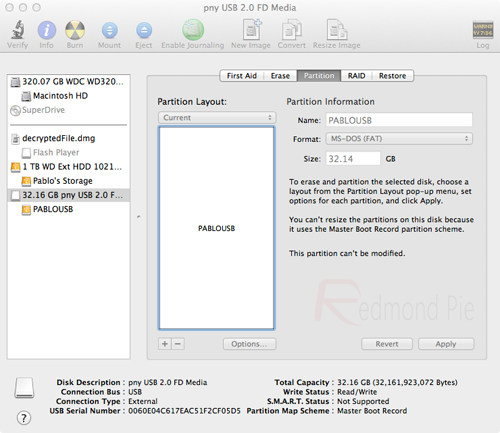
Step 3: After the relevant software has been downloaded, the initial step is to create a bootable USB drive containing OS X Mountain Lion. With the formatted USB plugged into an available USB port on your Mac, open up an instance of Finder and navigate to/Applications/Utilities/Disk Utility and highlight the relevant USB drive in the left hand column of the interface.


UniStep3


Step 4: Select the Current drop down menu and choose the 1 Partition option.
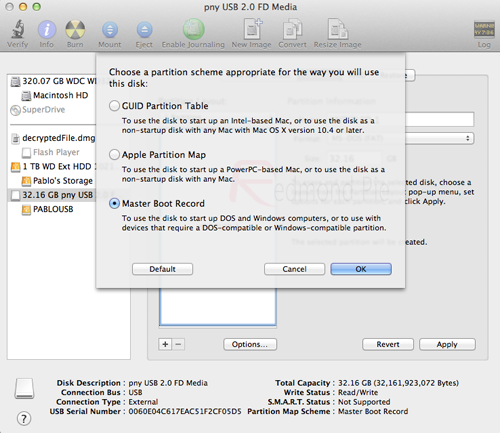
Step 5: Select Options underneath Partition Layout menu and make sure the Master Boot Recordoption is checked. Click Ok.


UniStep5


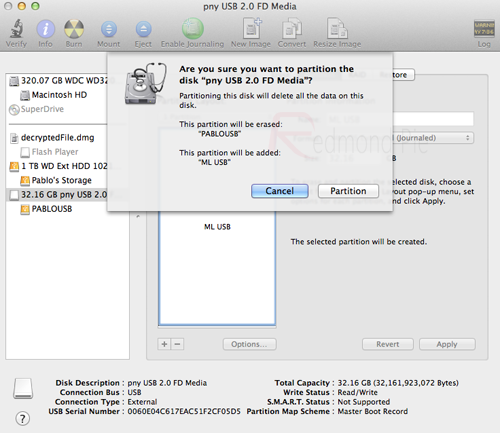
Step 6: On the right hand side of the Disk Utility window there are options to name the USB Drive. You can choose a name now or it can be done later. Under the Format header, make sure Mac OS Extended (Journaled) is selected. Select Apply before selecting Partition.


UniStep6


Step 7: Run the UniBeast 1.5.1 application that was downloaded in step 2. If UniBeast is giving you an error message relating to Mountain Lion being missing, make sure the installation file downloaded from the Mac App Store is located in the /Applications folder.
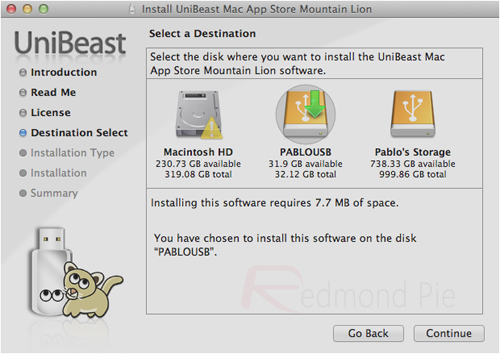
Step 8: When UniBeast is running, skip through the first few screens before selecting the relevant USB drive on the Select a Destination screen. Choose Continue, then enter your system password for approval. UniBeast will then look for the Mountain Lion installer file in the/Applications folder and install it to the USB drive.


UniStep8


Once the process has ran its course and completed, the partitioned USB drive will have a functional version of OS X Mountain Lion on it that can then be used on a PC to create an installation of Mountain Lion. The next few steps can be followed through to ensure everything is working without issue.
Step 9: Insert the USB drive into the PC that you want to turn into a Hackintosh and make sure that the machine is set to boot from USB through the BIOS.
Note: Steps 10 – 12 are only required for new installations. If you are updating from an existing installation of Mac OS X Snow Leopard or OS X Lion these steps can be skipped.
Step 10: After booting from the drive, you should now be in the OS X installer. Set the desired language, choose the Utilities option from the menu bar before selecting Disk Utility. Select the target hard drive for the installation of Mountain Lion on your PC and click the Partition tab.
Step 11: Once again, select the Current drop down, select 1 Partition before selecting Optionsand choosing GUID Partition Table.
Step 12: Type in Macintosh HD as the name of the partition and once again set the Format toMac OS Extended (Journaled).
Step 13: Click Apply then Partition before closing down the Disk Utility.
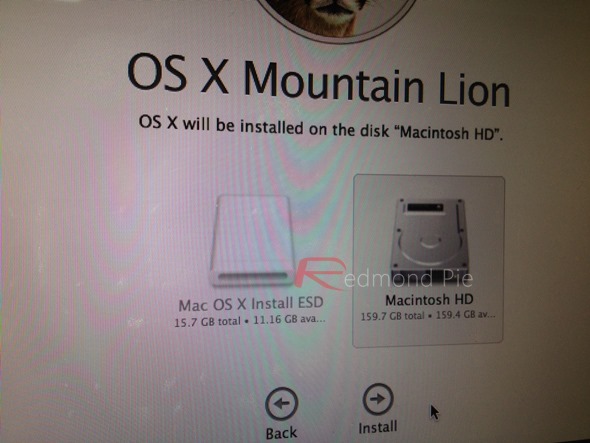
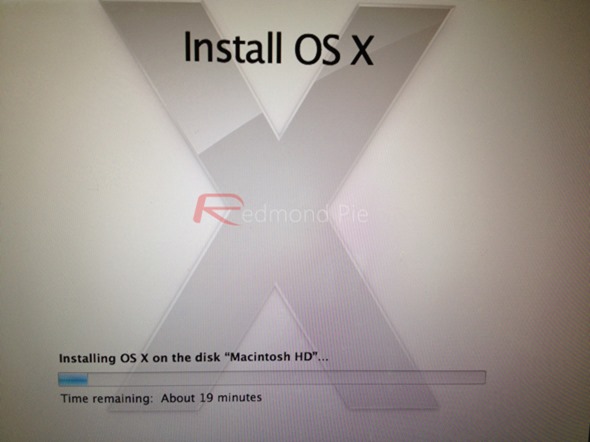
Step 14: Now simply install Mountain Lion on this hard drive.


photo 2
photo 4


When the process is completed, restart the machine. When the machine boots up, choose the new Mountain Lion option to make the drive bootable.


OS-X-MLion-PC
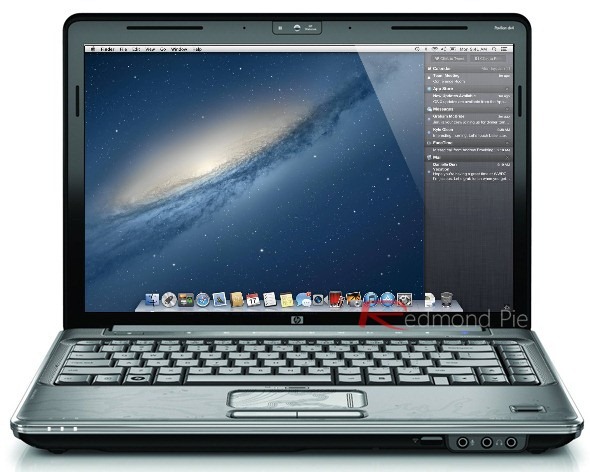
So there we have it, a fully functional Hackintosh PC running the latest Mac operating system. Last but not the least, you will need to install the drivers for your machine. This can be done using MultiBeast tool, which can again be found in the downloads section over at tonymacx86.
Apple will obviously tell you that the Mac machines they produce are designed to work harmoniously with the software and operating systems that they also develop, but running OS X on a Windows based PC can be an extremely pleasurable experience now that the installation process is relatively pain free.

Read More...