Subscribe all latest updates via Facebook

Facebook Likebox using jQuery Lightbox v1.0 Extended by Tech Prevue

Showing posts with label IOS. Show all posts

Tuesday, September 17, 2013

FIFA 14 For iOS Released, Download Now For Free!

1 comment
It may still be a week until FIFA 14 gets its console release, but that doesn’t mean that those packing an iOS device can’t get their (proper) football on.
Released as a 1.16GB install and costing nothing, the game is using the much travelled premium route in an attempt to get itself to the top of Apple’s game charts. Costing nothing up front is all very well and good, but if you’re going to nickel and dime your users afterwards then all everyone’s left with is a bad taste in our mouths. Thankfully, it would appear that someone at EA got things right this time around.

FIFA 14 iOS
screen568x568
In-app purchases come in two flavors. First, gamers can buy in-game currency just as seems to be the norm with any game that features in-app purchases. Secondly, and more interestingly, there’s an option to unlock the game’s ‘Premium’ mode for $5.99. Paying your six dollars kickoff, tournament, and manager modes, so we expect that’s the route that most people will want to take with FIFA 14.

screen568x568 (1)
All this sounds great, but there’s one issue. Currently, as far as we can tell, FIFA 14 is only available to gamers who use the New Zealand iOS App Store. Users in the US and UK are certainly out of luck currently, but if you know differently we’d love to hear from you.
There’s no word yet as to whether this is a soft launch of sorts, or whether the game will roll out to other regions over the coming hours. Soft launches are becoming more and more common as developers use them as a sort of public beta, especially if their game has a strong multiplayer or online element that means servers need stress testing or leveling needs tweaking.

screen568x568 (2)
At this point we’d like to think that the folks at EA know just what it takes to make a FIFA game work on iOS, but until told otherwise we’ll have to assume that the game isn’t coming out until the 24th of September, just like its big brother.
(Download: FIFA 14 for iOS on the App Store)
Read More...

Monday, September 9, 2013

Alleged iPhone 5S render shows new home button / 'Touch ID sensor

Leave a Comment

We're just a few hours away from Apple's big iPhone press conference, andNowhereelse.fr has just posted this render (from a "very reliable" source) that claims to show the iPhone 5S. The most notable change shown is of course, the home button, seemingly minus the usual squarish target and called the "Touch ID sensor". That is expected, considering repeated rumors (check out our roundup) including an apparent confirmation tonight from the Wall Street Journal, that Apple's next flagship phone will include a fingerprint sensor. Whatever the truth is, it will be unveiled at 1PM ET, and we'll be there liveblogging every minute.
Read More...

Tuesday, August 27, 2013

Official Chromecast App For iOS Is Now Available To Download

Leave a Comment
The Google Chromecast dongle has been making some ripples recently in the portable technology world. The little $35 dongle allows users to stream high-definition content directly to a TV set through service providers such as Netflix and YouTube. The content may be fairly limited at the moment, but with the Mountain View company planning on adding additional providers, the future looks bright for Google’s little connected device. Having said that, controlling and interacting with the Chromecast got a tad bit easier with the official release of the Chromecast app for iPhone, iPad and iPod touch devices.
Google is pushing the Chromecast as being one of the easiest ways for enjoying online videos and Web based content directly on the big screen in your home. The release of the universal iOS app certainly indicates that the company is committed to developing the product and ensuring that it’s as easy as possible to use and maintain. The majority of people are familiar with interacting and using smartphone apps, and the Chromecast app does a fairly good job of abstracting away any would-be complicated setup and maintenance processes.


The look and feel of the app follows Google’s trend of pushing out very clean and minimal software. It is immediately recognizable when placed alongside the Gmail or Google Maps apps, with the iPhone and iPad variants following the same design considerations. Rather than being a fully functional media based app, the Chromecast app is more of a setup and settings tool that allows users to get up and running with multiple Chromecast installations throughout the home and ensure that everything is working correctly. In short, it’s a ditto copy of itsChromecast for Android counterpart.


Users of the app can also interact with the currently running Chromecast dongles existing on the same network. A number of different device settings can be changed through the iOS app, which include amending the Chromecast dongle name as well as manipulating the currently connected Wi-Fi network. The actual dongle itself seemed like an extremely appealing option for those who love consuming visual media, but with the promise of additional content providers, and now the release of native apps, it’s starting to look like a must-have piece of kit.
(Source: Chromecast for iOS on the App Store)
Read More...

Thursday, August 22, 2013

Asphalt 8: Airborne For iOS And Android Now Available To Download [VIDEO]

Leave a Comment
Gameloft has taken to the mobile industry like a duck to water, and with a wide range of different titles available for both iOS and Android, the company has built a solid reputation for high-end, graphically-intensive fare. Asphalt, a nitrous-charged racing game, has been a staple part of the company’s range for a number of years, and today, the company has released Asphalt 8: Airborne for both iOS and Android. In addition, the Paris, France-based developer has revealed that the game will soon be arriving for Windows 8 and Windows Phone 8, while also outlining its intention to port a multitude of titles over to Microsoft’s fledgling platforms.
While exciting news for fans of racing titles, Asphalt 8: Airborne delivers much more of the same to anybody familiar with the series. Since the graphics, gameplay and selection of courses and challenges has always been top-notch, the continuation of this same ethos means Asphalt 8: Airborne is once again a joy to behold.


Asphalt 8 will soon be hitting Windows 8 and Windows Phone 8, and in what will serve as great news for a platform notably bereft of good games, Gameloft has announced that 14 other titles will be hitting the Windows Stores in the next year or so.


Among them, the likes of Dungeon Hunter 4, Despicable Me: Minion Rush, Total Conquest, and Six Guns – all of which will hit the market before the close of the year. Unfortunately, there’s no list for gamers on Windows to begin salivating over, but we’ll be keeping an eye out for specifics on those forthcoming titles as they become available.


Baudouin Corman, Gameloft’s Vice President of Publishing in the Americas, was beaming in his announcement of the new releases, noting:
Gameloft’s AAA-quality games are a perfect match for Windows 8 and Windows Phone 8 . . Microsoft’s platforms provide a great environment for serious and deeply engaging games. Gameloft will bring its full support, taking advantage of the platforms’ specific features.
While we await the new releases for Windows 8 and Windows Phone, the adrenaline-pumping eighth installment of Asphalt can be gathered via the links provided below.


(Download Asphalt 8 for iOS / Android)
Be sure to check out our iPhone Apps Gallery and iPad Apps Gallery to explore more apps for your iPhone and iPad, and also our Android Apps gallery to explore more apps for your Android device.
Read More...

BBM For iPhone And Android User Guides Now Available To Download

Leave a Comment
Blackberry’s BBM instant messaging service was once very popular, back when the company was at the top of its game, and indeed, on top of the smartphone market. Things have changed quite a bit in recent years, though, thanks in no small part to the likes of Apple’s iPhone and a deluge of Android devices, products have collectively left BlackBerry’s once-domineering brand on the brink of collapse. With the For Sale signs now up and the Canadian company on the hunt for investors, the fact that BBM for iOS and Android for both being announced is perhaps of little consequence, but in light of today’s leaking of the user guides for both the new apps, it would appear that a release is nigh.
Whether the leak was a genuine mistake or rather one of those accidentally-on-purpose moments tech companies tend to consult when looking for coverage, we can now be fairly sure that BlackBerry Messenger for Android and iOS will be here very soon. The Toronto-based outfit published the manuals today offering standard tips on how to get started, how the various features work, and general info on functionality.
As per the user guides, it would seem as though the iOS and Android versions of the app are, to all intents and purposes, fairly similar to what BlackBerry users will have seen before.


Whether BBM will make an impact with its second coming remains to be seen. Right now, BlackBerry certainly could do with the publicity, but where the service was immensely popular some three to five years back, there are plenty of alternatives now available besides. As well as the cross-platform WhatsApp Messenger, Facebook Messenger keeps over a billion connected, and with iOS users keeping connected through iMessage, BlackBerry should be releasing this app in hope, as opposed to expectation.
We shall keep a look out for the apps, and will be sure to notify you when that release does arrive, so stay tuned!
Meanwhile, you can download the iOS BBM manual
from here, and Android from here.
Update: It appears as though BlackBerry has taken down the user guide for BBM for iOS. We will update this post accordingly as we get our hands on a working link.
As we wait for BBM to reach the App and Google Play Stores, be to check out our iPhone Apps Gallery and iPad Apps Gallery to explore more apps for your iPhone and iPad, and also ourAndroid Apps gallery to discover more apps for your Android device.
Read More...

Sunday, August 18, 2013

How To Make, Receive, And Record Your Smartphone Calls From Your Mac [VIDEO]

Leave a Comment
Not so long ago, a computer was a computer, and a smartphone was a smartphone, but as the digital boom has continued to make strides, we’ve seen many a feature cross platform to ensure a more streamlined overall experience to the end user. Recognizing that checking one’s device constantly whilst at the desk can be somewhat counterproductive, developers have sought to find ways to bridge the gap, bringing seamless controls of certain mobile features without the need to look away. Dialogue, a new app for OS X, follows this motif to the book, allowing you to control your smartphone while using your Mac.
Not only is it light and rather easy on your resources, but it has its fair share of great little features to boot. Not only can you make calls using the app, but you can also record them, so if you’ve any important correspondence to which you may wish to refer back to later, you can save the file right on your desktop. Cool? We think so.


In essence, the app is like an extension of the Skype idea of making calls through a computer, but while you can usually get away with Skyping using your machine’s default mic and speakers, the makers of this app, Zebraa, suggest you’re probably better off buying a pair of headphones with a built-in mic for optimum performance.


The app is still fledgling, so does have its fair share of kinks that still need working out. As well as a slightly sub-par in-call performance, there are also some issues with contacts, which need to be synced to the desktop rather than being seamlessly plucked from iCloud. It’s not that much of a big deal, mind, and the app is still relatively usable even with these shortcomings. Also, Zebraa will be amending the problem in forthcoming updates, so for an initial release, the overall experience certainly isn’t bad going.


At just $6.99, it’s well worth a shot, particularly if you’ve been waiting in the wings for this kind of solution. If you don’t like apps that run like they’re still in beta, you may wish to hold off until the expected improvements are made, but for overall usefulness, Zebraa has the calling-from-the-desktop thing licked. And yes, it doesn’t just work with the iPhone; it does support many Android and Windows Phone devices out there.


(Download: Dialogue for Mac on the Mac App Store)
Be sure to check out our Mac OS X Apps Gallery to explore more apps for OS X powered computer.
Read More...

Monday, July 29, 2013

iOS 7 Beta 4 On iPhone 5: First Impressions

Leave a Comment
Arguably a week late due to Apple’s developer portal security breach and then that portal subsequently being offline for far, far too long, iOS 7 beta 4 is now finally in the hands of developers. Three weeks after the third beta was pushed out, this new fourth iteration brings with it the usual raft of interface changes as well as some tweaks under the hood. I’ve been using it for a good few hours at this point, and following on from my previous posts along the same vein, here’s how beta 4 is shaping up in these early hours after I updated my iPhone 5.
You don’t need to be some kind of ninja in order to get your hands on a change log for iOS 7 betas, and the fourth release is not much different to the three that came before it. I suspect the ones that come after it won’t differ a great deal either, but with iOS 7 being such a departure from the norm, and with so many changes shaking iOS users to their very core, this release of Apple’s iPhone and iPad software is as much about how it makes us feel as it is how it works at a fundamental level. After a few hours of use, beta 4 already feels rather different to the release that came before it.


Possibly a minor change, but one that new users and iOS novices will be very grateful for, is the removal of the lock screen arrow that implied an upwards swipe would unlock the device. Anyone with even a passing knowledge of iOS would know that a horizontal swipe is needed in order to get into the device, but that doesn’t make it good design. It’s a little change that makes much, much more sense now. We just wonder why it took four goes before they got it right.


As seems to be the case with each of these beta releases, Apple has tweaked and improved the animations that iOS 7 seems to favor so much. The interface flies around the screen in a noticeably snappier fashion than it did in beta 3, and that was an improvement over everything that came before it. With each beta release Apple seems to be improving transition times, making us wait less and less time before we can get on with what we need to do. Fancy transitions are great, but don’t make me watch them happen when I should be tapping things!


In the few short hours I’ve been using iOS 7 beta 4, I’ve not had the usual lock-ups or reboots/crashed apps that seemed to plague beta 3, though obviously it’s far too early to count our chickens in that regard. There are clearly things going on under the hood in iOS 7 beta that plenty of existing apps just don’t like, but as with all big operating system releases for any platform, it’s only a matter of time before developers get their software updated accordingly. Let’s hope the likes of Google+ and Skype get updated soon, though!


Overall, iOS 7 beta 4 feels more polished, almost more finished than earlier betas, and that’s exactly how it should be. We’re still quite some way away from the finished article and indeed, a public release of iOS 7. It’s clear Apple’s got some more work to do, though, and I’m sure beta 5 will be better still.
Hopefully we’ll find out in a couple of weeks.

Source: Redmondpie
Read More...

Wednesday, July 24, 2013

New iPhone 6 Concept Features 3-in-1 Foldable Screen In One Awesome Package [IMAGES]

Leave a Comment
The next-gen iPhone will probably take a similar form factor to the current flagship iPhone 5, leading many to believe the device will carry the ‘iPhone 5S’ moniker. However, Apple has a habit of changing things up and pulling the wool over everybody’s eyes, so until we see the device as revealed perhaps later this year, there’s scope for everybody to dream up their own ideas of the shape the next generation iPhone will take. That’s exactly what designer Pritesh Chavan has done with his transforming iPhone 6 concept that sees the device unfold into a phablet-type device before eventually revealing another seam to create a fully-fledged tablet.
We think it’s a pretty cool idea, and although it’s something Apple is unlikely to pursue anytime soon, it’s certainly a very interesting concept. The demand for larger screened smartphones is a trend Apple has, to a degree, already caved in to, and although the longer 4-inch display of the iPhone 5 isn’t exactly much to write home about, speculation suggests its successor is already subject to delay due to the fact that the Cupertino is considering going even larger with the next-gen handset.


Chavan’s concept folds out using a flexible display, and while it is, in concept, a very attractive and nicely arranged piece, this design wouldn’t work in practice; at least, not yet. The tech just is not yet in place for foldable innards, so as we continue to drool over this delicious iPhone 6 concept, we have to face the fact that it won’t be happening for a very long time.


Back on planet earth, I do hope the rumors of Apple breaking the 4-inch boundaries turn out to be true, even if this does mean delays. The thought of an iPhone 5S with incremental upgrades – including a bumped processor and iOS 7 off the bat – doesn’t particularly capture the imagination, and while it may not necessarily be the case that a bigger display is beneficial to everybody, it would be interesting to see if Apple are brave enough to give it a shot.


On the topic of the Chavan design though, would you buy it if it were real? Goodness knows how much a smartphone-tablet-phablet branded with that famous Apple logo would cost, but if money were no object, I don’t think I could say no to a device like this.
We have seen an iPhone phablet concept before, but this one, on a lot of levels, pushes the boundaries one notch further.
(Source: YankoDesign)
Read More...

Tuesday, July 16, 2013

WhatsApp For iPhone Updated: Features iCloud Backup Support, Send Multiple Photos And More

Leave a Comment


When it comes to cross-platform instant messaging, there are few able to compete with WhatsApp Messenger. Covering all of the major mobile operating systems, the only thing really missing from the repertoire is a Web app, but until that implementation arrives if ever, versions for iOS, Android, BlackBerry and others will do just nicely. Today, the iOS app has been given a reasonable update featuring iCloud chat history backup as well as support for sending multiple photos in a thread. Details after the jump.
As a long-time user of iOS and having, as such, become accustomed to iMessage, my switch to Android as a daily driver required a decent messenger as a matter of priority. Facebook Messenger and Chat Heads, which incorporates the native messaging app, has stood me in good stead, but without WhatsApp as a kicker, I wouldn’t have been able to keep in touch with half of my contacts.


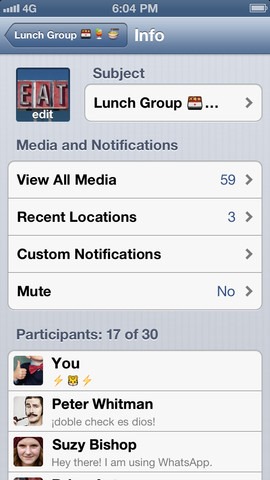
mzl_fkywzupp_320x480-75


The app does have its inherent flaws, such as lack of any kind of ability to send full, high quality images, but I would think this has much to do with users unwittingly running up humungous carrier bills as anything else. Minor gripes aside, WhatsApp is a stellar service, and it’s little wonder consumers from all platforms swear by it.


mzl_jdjfaahv_320x480-75


The latest update, which is only specific to those on iOS, brings in iCloud support for the backing up of conversations – pretty handy if you use iCloud for everything else. The feature has been a long time coming, and now, those looking to store conversations can do so indefinitely thanks to the power of Apple’s ridiculously efficient cloud service.


mzl_ovdspjoe_320x480-75


Allied to iCloud support, there’s also now the ability to send multiple photos to a contact at any one time, so if you’re busily pushing through a whole album of last night’s antics, you can spend less time selecting then sending, and more time nursing that mysterious headache.
WhatsApp is, completely free of charge from this update onwards, and you can grab it via the link below or apply the update through App Store on your iPhone.
Here’s to hoping that an iPad or iPod touch client makes its way to the App Store in the near future!
(Download: WhatsApp for iPhone on the App Store)
Be sure to check out our iPhone Apps Gallery and iPad Apps Gallery to explore more apps for your iPhone, iPad and iPod touch.

Source : RedmondPie
Read More...

Thursday, July 11, 2013

How To Restore iOS 6.1.2 Device Without Losing Jailbreak [Video Tutorial]

Leave a Comment
If you pay attention to the jailbreaking scene, you’ll be aware that the current state of jailbreak is not a good one. Currently, all A5+ devices cannot be jailbroken on the current iOS version, 6.1.3 or 6.1.4. Apple has stopped signing the iOS 6.1.2 firmware, which is the last firmware compatible with the Evasi0n untethered jailbreak.
Whilst this isn’t a huge problem for many jailbreakers, after all you can just choose not to update your firmware, it becomes an issue when you need to restore your device to stock iOS. You might need to do this for many reasons, such as a problem with a certain package or setting, and until now the only way to do so was to lose your untethered jailbreak. Enter Semi-Restore.


DSC_0001


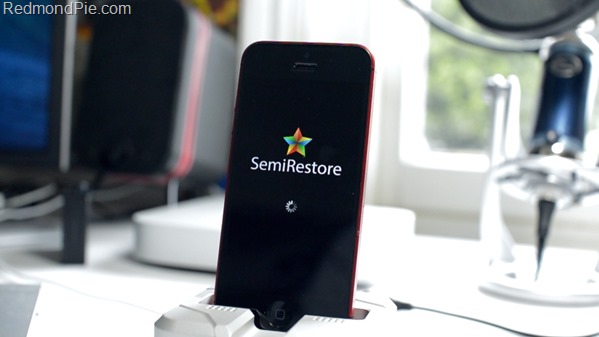
Semi-Restore is a Mac or PC application, which brings a one click restore to your jailbroken device, but what is special is that it will not erase your device’s jailbreak. This is an extremely useful tool, and I’m extremely excited it’s finally arrived. All you need to do is head over to the Semi-Restore website: semi-restore.com, and download the specific software for your operating system. After doing this, the video embedded below will walk you through the very simple how-to process:
Note: Semi-Restore is compatible with all jailbroken iPhones, iPads, and iPod touches running iOS 5.0 through iOS 6.1.2.


This tool comes as huge relief to me, and many other members of the iOS jailbreaking community. It has always been a nightmare trying to figure out how to workaround issues with your iOS install, but this no longer is the case. With an incredibly simple one click interface, you’ll have as close to stock iOS on your jailbroken device as you could hope for.
SemiRestore


I would advise backing up your device before attempting this process, to ensure no critical data is lost during the restore. However if you’re having problems with a totally bricked phone, for instance, it may be better to perform a totally clean install and remove the added variable of a potential corrupt backup. I’m extremely happy and excited that Semi-Restore has arrived, it should save us all a lot of hassle!

source : RedmondPie
Read More...

Wednesday, July 10, 2013

Enable Personal Hotspot (Wi-Fi Tethering) On iPhone For Free [No Jailbreak Required]

Leave a Comment

Having the ability to natively share an internet connection from mobile to other personal devices for free is definitely a beneficial feature that comes in handy at differing times. However, as handy as the feature is, some users often find themselves infuriated when they realize that their carriers have either disabled the feature or want to charge a premium on top of their current plan to use it.
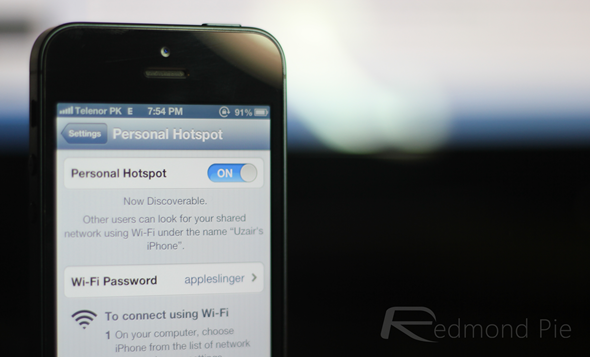
This guide, which comes courtesy of iTweakiOS, goes through a process of enabling personal tethering on iPhone without having to jailbreak the device. And it’s actually pretty easy to follow if you a spare few minutes lying around!
ios hotspot
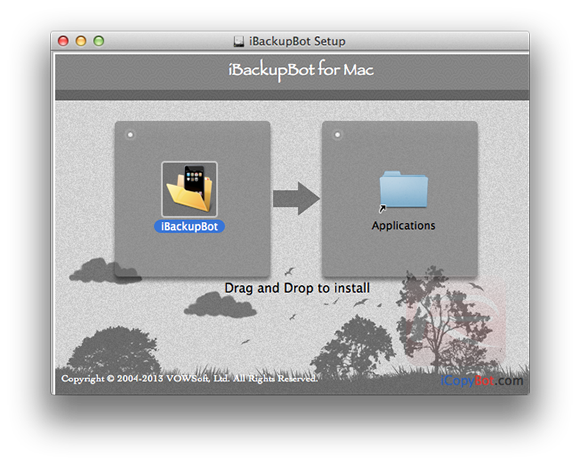
Step 1: Download and install the iBackupBot app for the relevant operating system (Windows /Mac). This is a third-party software that is available as a free-of-charge download and essentially allows users to view, export and edit files that have been backed up to iTunes.
Tethering_StepOne
Step 2: Launch the latest version of iTunes on your Mac or Windows PC and connect the relevant iPhone using the supplied USB or Lightning cable.
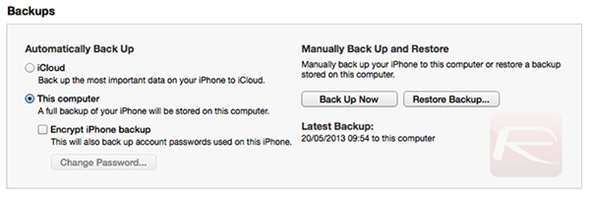
Step 3: Create a backup of the connected device by clicking on the device name in the left tree window and then selecting the Back Up Now option from the main iTunes interface.
Tethering_StepThree
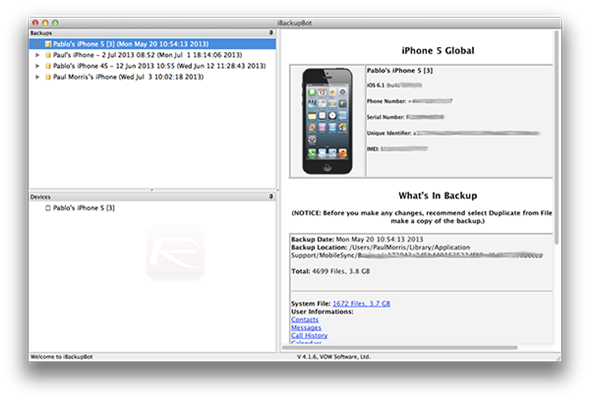
Step 4: Minimize iTunes so it isn’t in the way. Launch iBackupBot that was installed in Step 1 above. It is possible that iBackupBot will present a number of errors during the launch process. If this is the case then skip past them by selecting ignore or continue.
Tethering_StepFour
Step 5: When the app has been launched, the left-hand tree menu will present a list of all backups that it finds within the iTunes library. Select the latest one (the backup from Step 3) and then click on the ‘+‘ symbol that is attached to the backup.
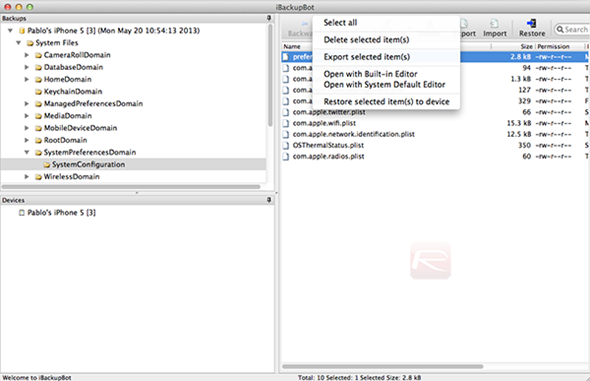
Step 6: When the + button has been clicked, a new set of options will appear. Navigate toSystem Files > SystemPreferencesDomain > SystemConfiguration and then right click on the file that is called preferences.plist. Select the Open with Built-In Editor option.
Tethering_StepSix
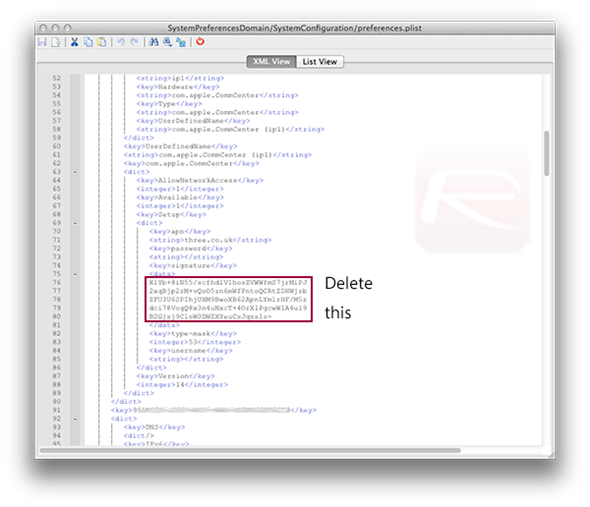
Step 7: When the file has been opened with the built-in editor, scroll down until you find the tethering APN that is associated with the specific carrier of the device in question. If this APN is unknown, then a quick Google search for an individual carrier’s APN should prove fruitful. It’s also important to erase the lines of code in the tethering APN field as shown below:
<key>signature</key>
<data>
RANDOM LETTERS, SYMBOLS, AND NUMBERS WILL BE HERE
</data>
Tethering_StepSeven
Step 8: When the tethering APN has been located, the next step is to manually change the data to reflect that of the regular data APN that the device currently uses to access the web through cellular data. As an example of this, a user on the T-Mobile network would change the APN to either: fast.t-mobile.com or epc.tmobile.com
Step 9: When the changes have been made, save the file and exit out of the iBackupBot app.
Step 10: Head back into iTunes. Select the device from the list and select the Restore from Backup option while holding the Option key (SHIFT key for Windows users) down. Select the backup that refers to the one just edited in the iBackupBot app and allow the process to complete. Tethering should now be enabled on the device.
(Source: iTweakiOS) credit : RedmondPie
Read More...

Tuesday, July 9, 2013

Plants Vs. Zombies 2 Hits iOS App Stores

Leave a Comment
While physics-based puzzlers are perhaps the most popular variety of mobile games, a certain army of tower defense fans may have a case to refute such a claim. From Fieldrunners toBloons TD, there are perhaps hundreds of these addictive strategy titles available on the App Store, but few have reached the level of popularity of Plants Vs. Zombies. Today, the sequel to the original, which has naturally been entitled Plants Vs. Zombies 2, has become available at the Australian and New Zealand App Stores, and although the U.S. / worldwide rollouts tend to follow shortly thereafter, it looks as though the rest of us won’t be seeing the game just yet.
Like the current craze that is the Candy Crush Saga (although perhaps less of a shakedown in that you only need to cough up your pennies just the once), Plants Vs. Zombies has prided itself on its innocent-looking environment; a guise for what is an extremely tricky title once you get started with it. Like most tower defense titles, it’s all about thing ahead, and Plants Vs. Zombies 2 offers more of the same for those who enjoyed the first installment.
PVZ2
Although Plants Vs. Zombies hasn’t been as successful as the likes of Angry Birds or Cut the Rope, it’s been a champion in its own right; a mainstay near the summit of the App Store charts for many a year. The wait for a follow-up has been lengthy, but according to the release notes from Electronic Arts, worth sitting on a lawn all summer for.
The staggered release for the rest of the world is to enable EA to “test out all of the new systems and features built into the game,” and since PvZ 2 wasn’t actually meant to release until July 18th anyway, we’ll let them off.
PVZ2a (1)
Apparently, the new innovations will require "large tests" to be performed ready for the worldwide drop, so don’t be surprised if you have to wait a couple of weeks to see what all the fuss is about. Still, it’s not as though PvZ hasn’t been out for years already; a short wait longer for the sequel won’t hurt.
PVZ2a (2)
Oh, and if you do happen to reside within Australia or New Zealand, you can grab the free title from the link below.
(Source: Plants Vs. Zombies 2 for iOS on App Store AUS / NZ)
Read More...

Sunday, December 9, 2012

SMSOptions Pro Brings Additional Power To Text Messaging On iPhone

Leave a Comment

When the Apple iPhone first launched in 2007 it came with pretty much the same Messages application that we all know and use so frequently on a daily basis. Apple have obviously come to the conclusion that the current app is powerful enough as the Messages app hasn’t really changed much in the six iterations of iOS and although we have seen a few visual changes and the introduction of iMessaging, the app has stayed fairly true to the original release all those years ago. The jailbroken Cydia store does play home to a number of SMS based tweaks and enhancements, with one of the newest being the SMSOptions Pro package.
Packages like BiteSMS and iRealSMS offer extensive power and functionality and exist to be a full replacement for the stock Apple Messages application. However, if replacing the main app is not on your agenda and all you requires is a little additional control over texting then SMSOptions Pro could prove useful. The package basically comes with three main functions that all hook directly into the stock Messages app: being able to delete all messages in one go, arrange and distribute auto-reply messages and hide or unhide private messages.
Messages icon iPhone
The first little addition comes in the form of being able to delete all message conversations in one go. For some reason Apple only allow messages to be deleted one-by-one meaning that those with extensive inboxes could be there for quite some time. The second enhancement allows jailbroken iPhone owners to quickly hide or unhide messages that they deem to be private with just one click. Finally, the developer has also seen fit to include the ability to send out an auto-reply to incoming messages if the recipient is busy or doesn’t want to seem ignorant by not replying.
1
2
The functionality isn’t extensive and packages like the aforementioned BiteSMS will be better suited to those who want to entirely customize and change their messaging experience on the device. However, for those who want the included enhancements then SMSOptions Pro is available now.
SMSOptions Pro is available from the MacCiti and ZodTTD repository with no specific mentions of iOS requirements.
Be sure to check out our iPhone Apps Gallery and iPad Apps Gallery to explore more apps for your iPhone and iPad.
Read More...

First Images Of iPhone 5S Leaked Online

Leave a Comment

The iPhone 5 may have only been with us for close to eleven weeks, but it seems like it is already turning into old news, with the speculators choosing to discuss what Apple is planning on bringing us with the seventh-generation iPhone, or the iPhone 5S as some are already choosing to call it. We have already heard some initial conjecture focusing on the possibility of Apple putting the next iPhone into early testing to overcome some engineering obstacles that they are facing with the current iPhone 5, and now we are seeing images of what are claimed to be the rear shell of Apple’s next smartphone.
It does seem a little early to be getting embroiled in a debate over whether or not we are actually looking at official components from the Cupertino company’s next-generation iPhone, but as always, the parts do contain some indications that they could be genuine. The majority seem to believe that Apple will once again alter the annual launch cycle of the iPhone and revert back to the original mid-June reveal, potentially to be able to present the new hardware during WWDC, but also due to the fact that Apple now seem to be planning on releasing new iPads around the October period in time for the holiday season.
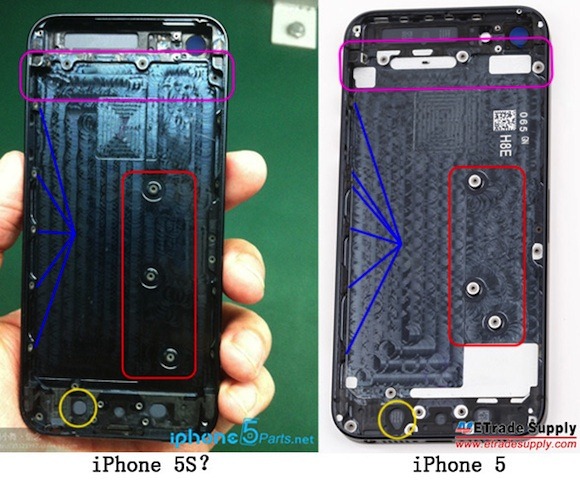
The parts that have surfaced are believed to be of the rear shell of the iPhone 5S, and could possibly come from the rumored batch of 50,000 new iPhones which Apple were said to have ordered as part of a first trial run of the new device. The images themselves look like they were captured on an assembly line rather than just showing up randomly at some obscure place, but they also have striking similarities to the current model iPhone but with notable differences that would suggest Apple is going for the current design but changing the way that the logic board is housed.
iphone_5s_5_rear_shells
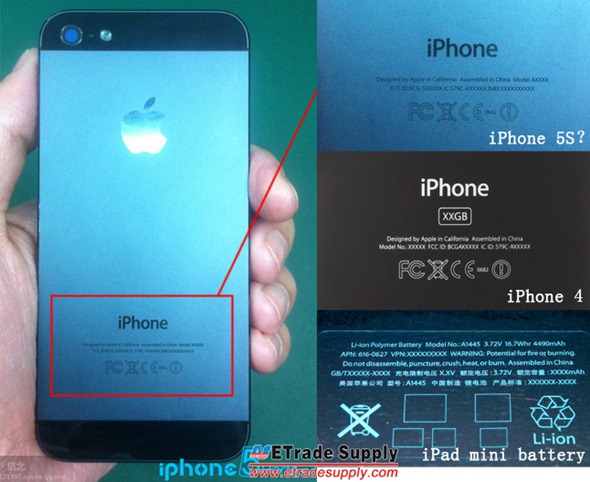
The printing on the rear of the shell doesn’t confirm any particular model or serial number and could purely be left blank to indicate that the shell comes from an early prototype device. The internal fastenings in the shell that are used to secure important components have also changed ever so slightly. The configuration for the logic board connections show the most notable change, but if this is a legitimate component, then it looks like Apple is planning a few little internal changes for the future.
iPhone-5S-rear-housing-1
Whether or not this part is from an actual seventh-generation iPhone remains to be seen, but it seems that the rumor mill has most definitely started early for the iPhone 5S.
(via MacRumors)
Read More...

Thursday, November 1, 2012

Download iOS 6.0.1 For iPhone, iPad, iPod touch [Direct Links]

Leave a Comment

Download iOS 6.0.1 For iPhone, iPad, iPod touch [Direct Links]


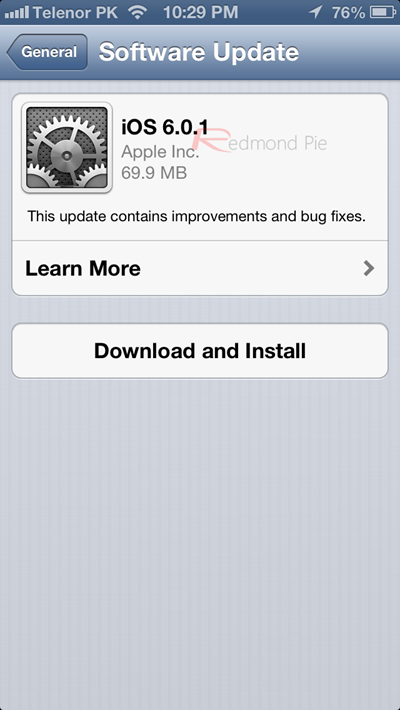
Apple have just officially flipped the switch on the release of iOS 6.0.1 update for their sixth major iteration of the iOS mobile operating system for compatible iPhone, iPod touches andiPads. Users of Apple’s mobile hardware found themselves able to initially benefit from the reported two hundred new features that were bundled into iOS 6 back in September when it first became available. iPhone 5 owners on the other hand had to wait an additional two days to get their hands on iOS 6 when the device launched around the world.
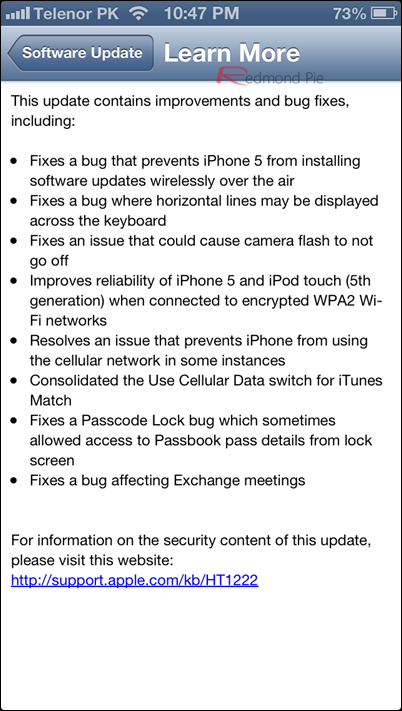
As promised, today’s iOS 6.0.1 release brings performance improvements and bug fixes found in the initial release of iOS 6. Some of these include: fix for horizontal lines on keyboard, fixes for Microsoft Exchange and Passbook bugs, fix for Wi-Fi connectivity issues, bug fix related to Camera app and more.
ios 61 (2)
Here’s the full official change log from Apple:
iOS6.0.1
iOS 6 users who were facing the above mentioned problems will be hoping that these small anomalies will be eradicated by this update once and for all.
It is not confirmed yet but hopefully Apple may have also taken this opportunity to inject some additional data and improvements into their new Maps app, which was center of huge criticism from users all around the world on the eve of initial iOS 6’s launch.
Owners with compatible devices (iPhone 5, iPhone 4S, iPhone 3GS, iPad 4, iPad 3, iPad 2, iPad mini, iPod touch 5, iPod touch 4) can opt to update to iOS 6.0.1 over-the-air (OTA) through theSettings.app –> General –> Software Update option found on the device, or alternatively by downloading and installing the update through iTunes.
6.0.1
Official direct download links from Apple for all the compatible devices are given below:
Read More...